News
New Project Spotlight
Even though MECControl is no longer in development, people are still doing cool things with it!
Here Robert Weiss has automated his model of Brian Compton’s Coal Loader, first using MECControl, and then once it was working, using AI to create a bespoke Arduino sketch based on the MECControl sequence, so that he no longer has to have his computer connected to run the model:
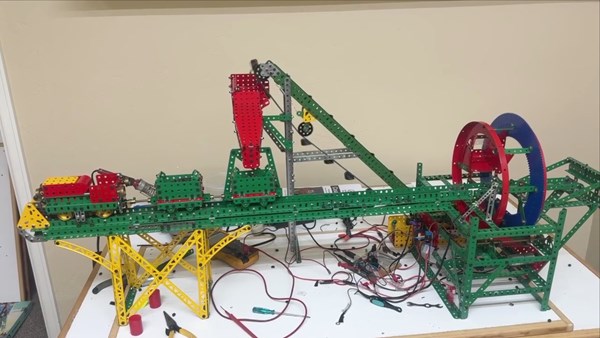
You can watch a video of it in operation on our Videos page or via our YouTube channel.
Robert also has a gallery of photos and videos, with commentary, in the Meccano “Nuts” Facebook group.
A small update
In today’s small update to MECControl, accessing the Position property of a potentiometer will now return a percentage that is accurate to 0.5%.
If you have previously purchased the MECControl software, you can download the new version from the order summary after logging into your account. There is no need to update your Arduino Uno/Mega firmware.
New mathematical functions
Today’s update to MECControl adds the ability to use the Absolute, Arccosine, Arcsine, Arctangent, Ceiling, Cosine, Floor, Round, Sine, Square Root and Tangent mathematical functions with the Let command — if you’re unfamiliar with these, take a look at the examples in the Help section.
There is also a refinement of the Run command — if you use a speed variable with it and the variable contains a negative value, this will now cause the direction of the motor to be inverted.
If you have previously purchased the MECControl software, you can download the new version from the order summary after logging into your account. There is no need to update your Arduino Uno/Mega firmware.
Two new Project Spotlights
Here are two new Project Spotlight videos featuring models controlled with MECControl:
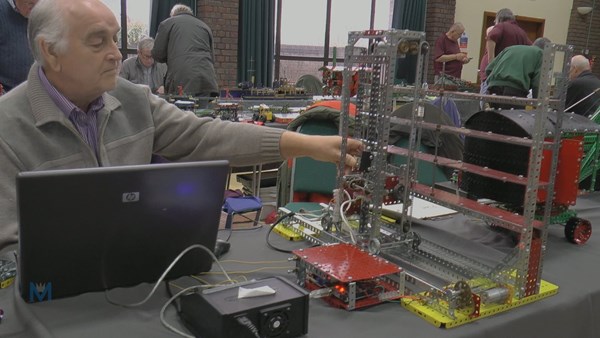
Philip Drew has built an automated warehouse pallet stacking crane:
Pete Evans has built a model of an Hitachi 650 backhoe excavator:
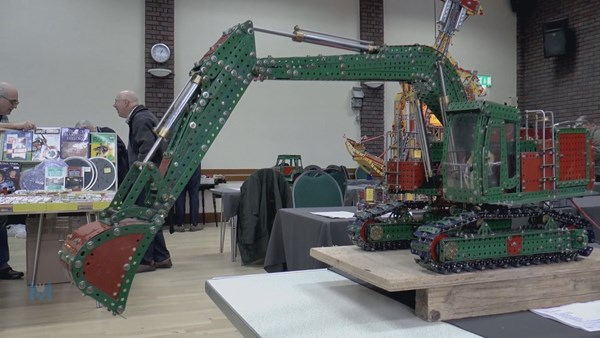
You can watch both videos on our Videos page or via our YouTube channel.
Keyboard input update
Just a small update to MECControl today — when using the Wait command to wait for a keypress, you can now test to see if any key, or no keys, were pressed using the Jump command.
If you have previously purchased the software, you can download the new version from the order summary after logging into your account. There is no need to update your Arduino Uno/Mega firmware.
A computer-controlled robot arm
In this Project Spotlight Roelf and Pieter Valkema demonstrate their computer-controlled robot arm at this year's Henley Gathering. You can watch it on our Videos page or via our YouTube channel.
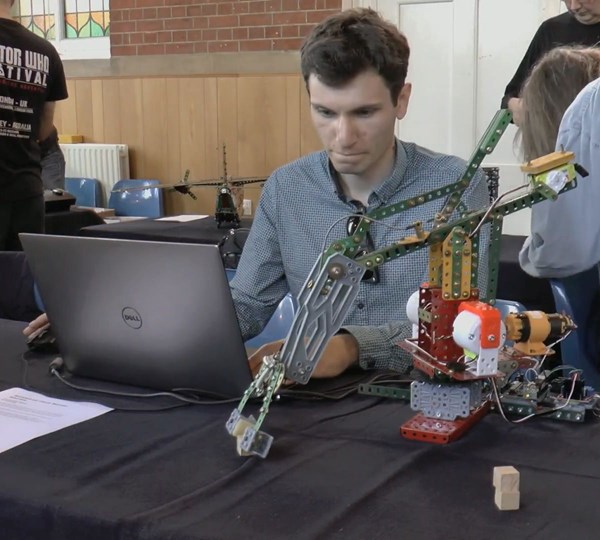
The arm uses three Meccanoid servos to provide hand, elbow and shoulder motions, controlled via an Arduino Uno and the MECControl software. A motor, controlled via the Arduino Uno and an L298 H Bridge module, allows the whole arm to rotate, with positional feedback given by a potentiometer.
A computer-controlled gantry crane
Our latest Project Spotlight features Philip Drew's new computer-controlled gantry crane, demonstrated at this year's International Meccano Model Show. You can watch it on our Videos page or via our YouTube channel.
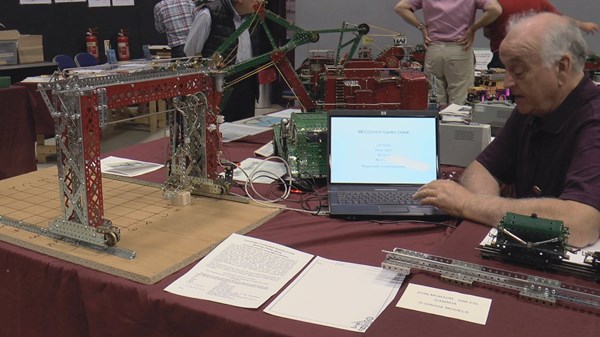
Philip has built on his previous MECControl experiment (see our previous Spotlight) to create a crane controlled from his laptop via keyboard commands. The operator simply enters a letter and a number and the crane moves to the corresponding row and column. Further keyboard commands allow the arm to be raised and lowered, and the grab to be opened and closed. The current status of the crane is displayed on the laptop screen.
The crane uses four motors, three potentiometers and one microswitch, controlled via an Arduino Uno and two L298 H Bridge modules, both of which are available to buy from the MECControl shop along with the MECControl software.
International Meccano Model Show
I´ll be at the International Meccano Model Show in Skegness from tomorrow, Friday 23rd June until Sunday 25th June, giving demonstrations of the MECControl system and answering questions. Plus I have many of the items that you´ll find in our shop available for sale too.
The show is on from 10am to 5pm each day at the Embassy Theatre on the Grand Parade — find out more here: https://embassytheatre.co.uk/shows/international-meccano-model-show.
Hope to see you there!
Arduino Mega support
The Arduino Uno can be a bit limiting sometimes, as it only has 12 digital pins and 6 analogue pins available for you to connect devices to when it’s used with MECControl.
So MECControl now supports the Arduino Mega, the Uno’s big brother, giving you 52 digital pins and 16 analogue pins to play with! Even better, 15 of the digital pins can used for controlling motor speed or LED fading.
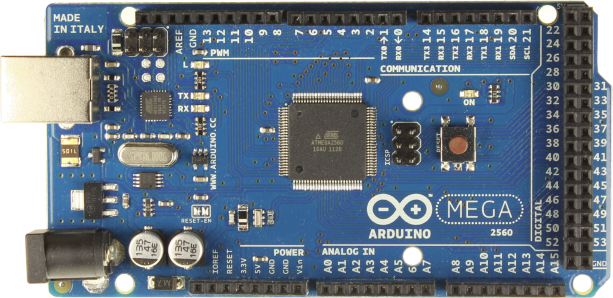
When using an Arduino Mega with MECControl, make sure that you place the Board command somewhere in your sequence, otherwise MECControl will assume that you are using an Arduino Uno.
If you have previously purchased the software, you can download the new version from the order summary after logging into your account.
Because there are some changes to the MECControl firmware too, you will also need to download and install firmware version 1.3.0 on your Arduino Mega.
- If you only using an Arduino Uno with MECControl, there is no need to download the new version or update the firmware at this time, as no other changes have been made to the software or firmware.
If you have any questions, please let me know!
MECControl update!
A small update to MECControl is now available to download, and it includes a few improvements to the new display window feature plus a new shortcut for commenting-out lines:
- Stop now restores the display window if it is maximised and located on the same monitor as the main window.
- Pressing F11 now maximises and restores the display window.
- Improved display window performance.
- Added the ability to press CTRL + - to comment out selected lines.
If you have previously purchased the software, you can download the new version from the order summary after logging into your account. There is no need to update your Arduino Uno firmware.
Displaying shapes and text
The latest version of the MECControl software is now available to download. You can now draw shapes and write text in your sequences using the new display window feature.
To find out more, take a look at ‘Using the display window’ here and check out these new commands:
- Clear — clears the whole display window, or specific shapes or text displayed on it.
- Draw — draws lines, circles, rectangles and squares.
- Use — allows you to change the appearance of shapes and text.
- Write — writes text, numbers stored in variables, or any combination of the two.
If you have previously purchased the software, you can download the new version from the order summary after logging into your account. There is no need to update your Arduino Uno firmware.
If you have any questions, please let me know!
Keyboard input
Hot on the heels of our last ‘small’ update comes a larger one! You can now use the Wait command to wait for a keypress, then use Jump commands to make decisions based on the key that was pressed.
You can test for most of the keys on the keyboard — there’s a list on the Jump help page, plus an example sequence. The Wait help page has been updated too.
If you have previously purchased the software, you can download the new version from the order summary after logging into your account. There is no need to update your Arduino Uno firmware.
A computer-controlled crane
Our first Project Spotlight video features a crane built by Philip Drew from the Runnymede Meccano Guild. You can watch it on our Videos page or via our YouTube channel.
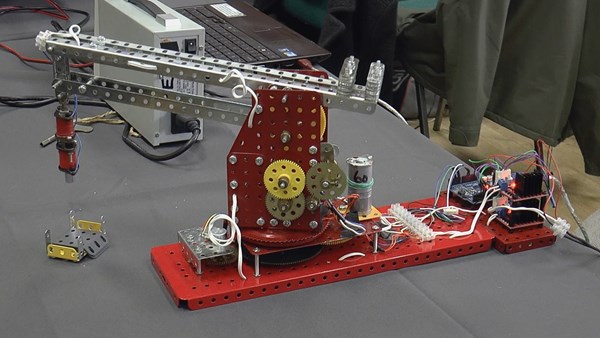
Philip’s crane has two motors providing slew and jib raise/lower motions, with positional feedback provided by two potentiometers. Meccano parts can be picked up using an electromagnet. Everything is controlled from a laptop running a MECControl sequence.
The electronic parts include a compatible Arduino Uno connected to the laptop and two L298 H bridge modules which control the motors and electromagnet.
- Have you built something great with MECControl that could feature in a future Project Spotlight? Please get in touch.
MECControl update!
An small update to MECControl is now available to download, which amongst other things fixes a long-standing bug which sometimes left MECControl unable to connect to a plugged in Arduino Uno.
If you have previously purchased the software, you can download the new version from the order summary after logging into your account. There is no need to update your Arduino Uno firmware.
MECControl at your command (line)
The latest version of the MECControl software is now available to download, and it adds a new feature for advanced users: command line control. This can allow you to control the basic behaviour of MECControl from your own programs or batch files using the command line.
Support for motors has also been improved — if your H Bridge circuit only requires Enable and Direction inputs, you can now specify just two pins in the Connect command.
If you have previously purchased the software, you can download the new version from the order summary after logging into your account. There is no need to update your Arduino Uno firmware.
More video tutorials…
The latest videos in my MECControl tutorial series are now online, covering the connection of buttons, switches and motors. You can watch them here, via the MECControl YouTube account, or via the new links in the Help section.
Video tutorials
The MECControl website now has a Videos section. In it you’ll find the beginnings of a tutorial series that I’m making which shows how you can use MECControl to control your devices.
The first five videos cover installing the firmware and software, provide a quick tour of the software, and show how LEDs of different types can be connected.
You can watch them here or via the MECControl YouTube account.
Smooth operators
The latest versions of the MECControl software and firmware are now available to download.
In version 1.1.1 of the software, you can now move Meccanoid Servo Motors smoothly over a given period of time using the Move command, and I’ve added some new colour names for you to use with full-colour LEDs. There have been a few other improvements too.
If you have previously purchased the software or the Starter Pack, you can download the new version from the order summary after logging into your account.
Because there are some changes to the MECControl firmware too, you will also need to download and install firmware version 1.2.0 on your Arduino Uno.
If you have any questions, please let me know!
Haven’t got an Arduino Uno? No problem!
Now you can get started with MECControl the easy way, with the new MECControl Starter Pack!
The pack contains the MECControl software, an Arduino-compatible Uno R3 board with the MECControl firmware pre-installed, buttons, microswitches, a full-colour LED, jumper wires and an L298 H Bridge module for motor control.
Take a look here.
Alternatively, if you already own an Arduino Uno, you can download the free MECControl firmware and then purchase the MECControl software separately from our shop for £3.99, which includes free updates for one year.
If you have any questions, please let me know!
More devices to control…
The latest versions of the MECControl software and firmware are now available to download, adding Relays, Solenoids and Stepper Motors to the list of devices that you can control.
If you have previously purchased the software, you can download the new version from the order summary after logging into your account.
Because there are some changes to the MECControl firmware too, you will also need to download and install firmware version 1.1.0 on your Arduino Uno.
If you need any help, or have built something great using MECControl, do let me know!
MECControl released!
The first versions of the MECControl software and firmware are now available to download.
With them you can use an intuitive language to control devices connected to your Arduino Uno from your Windows PC. You can currently control buttons, LEDs, Meccanoid devices, motors, potentiometers and switches, but I intend MECControl to support more devices as development continues. You will be able to download free software updates for one year from date of purchase that may include support for new devices.
- Download the free MECControl firmware for your Arduino Uno.
- Buy the MECControl software for your Windows PC for £3.99 (includes free software updates for one year).
- Take a look at our range of electronic components that you can use with MECControl. Each one comes pre-wired with leads so that you can start using it right away. Just plug it into your Arduino Uno — no soldering required!
- Learn how it all works in our Help section.
If you have any questions, please don’t hesitate to ask!